Template previews
Free Long Division Calculator Spreadsheet Template
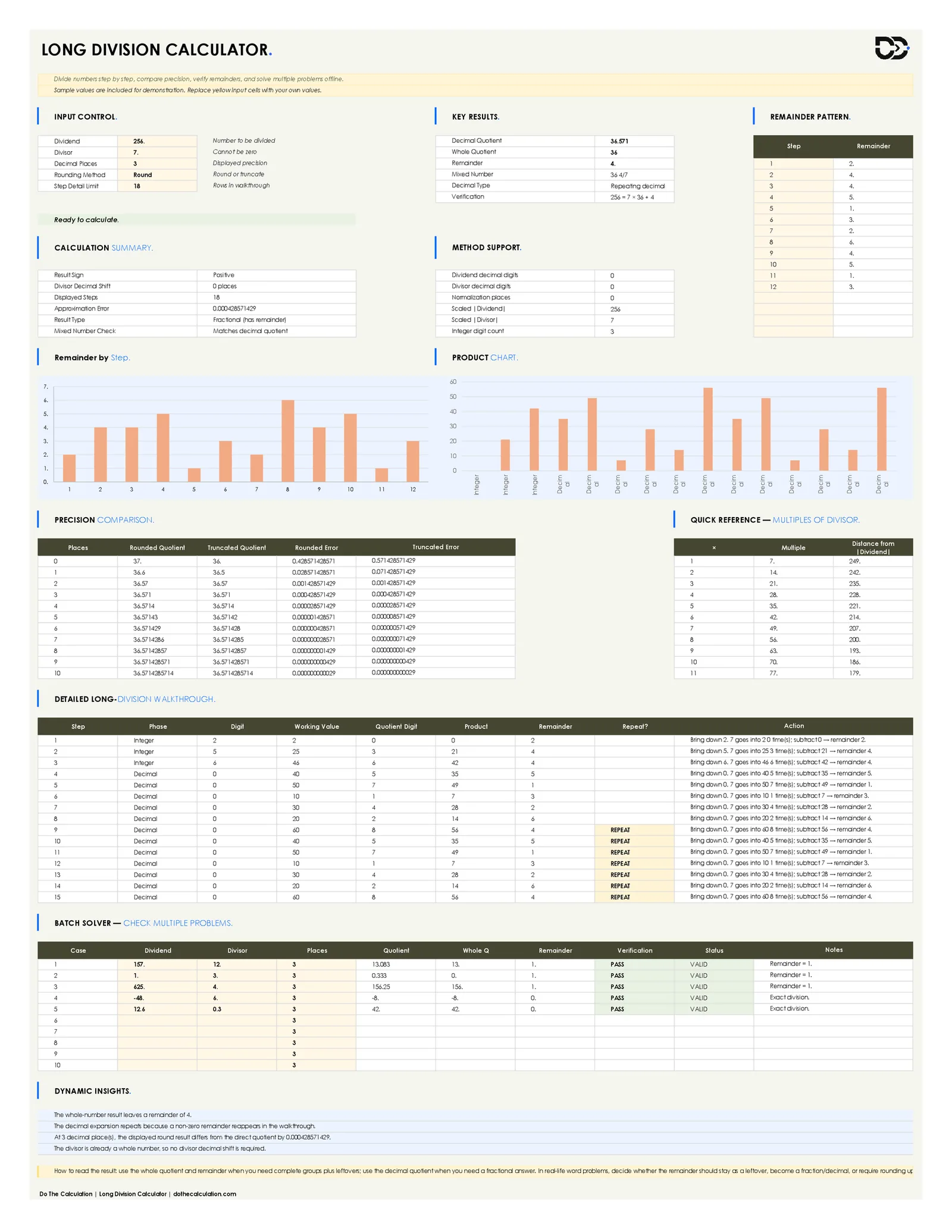
Long division is one of those math skills that's easy to get wrong in a way that still looks almost right: a dropped digit, a subtraction slip, or a misplaced decimal point can throw off the whole answer without being obvious at a glance. This Long Division Calculator spreadsheet template is built to catch that. It doesn't just return an answer; it shows the full divide-multiply-subtract-bring-down cycle one step at a time, the same way the problem would be worked by hand, so you can see exactly where a number came from.
The workbook handles positive and negative numbers, decimal divisors, and configurable decimal precision, then independently verifies every result against the identity Dividend = (Divisor × Whole Quotient) + Remainder. Whether you're checking homework, building practice problems, or reviewing several calculations at once with the batch solver, this template gives you the full working, not just the final number.
What Is Included in This Long Division Calculator Spreadsheet?
This Long Division Calculator spreadsheet template includes a complete calculation workbook across three connected sheets: a Settings & Guide sheet, the main Calculator sheet, and an About sheet.
- Dividend and divisor input fields with support for negative numbers and decimal divisors
- Configurable decimal places (up to 12) and a choice of rounding or truncating the displayed quotient
- Decimal quotient, whole quotient, remainder, and simplified mixed-number results
- Independent verification check confirming Dividend = Divisor × Whole Quotient + Remainder
- A full digit-by-digit long-division walkthrough showing each divide, multiply, subtract, and bring-down step
- Automatic repeating-decimal and terminating-decimal detection
- A remainder-by-step chart and a product chart visualizing the walkthrough
- A precision comparison table showing rounded vs. truncated results across 0–10 decimal places
- A quick-reference table of the first several multiples of the divisor
- A batch solver for checking up to 10 division problems at the same time
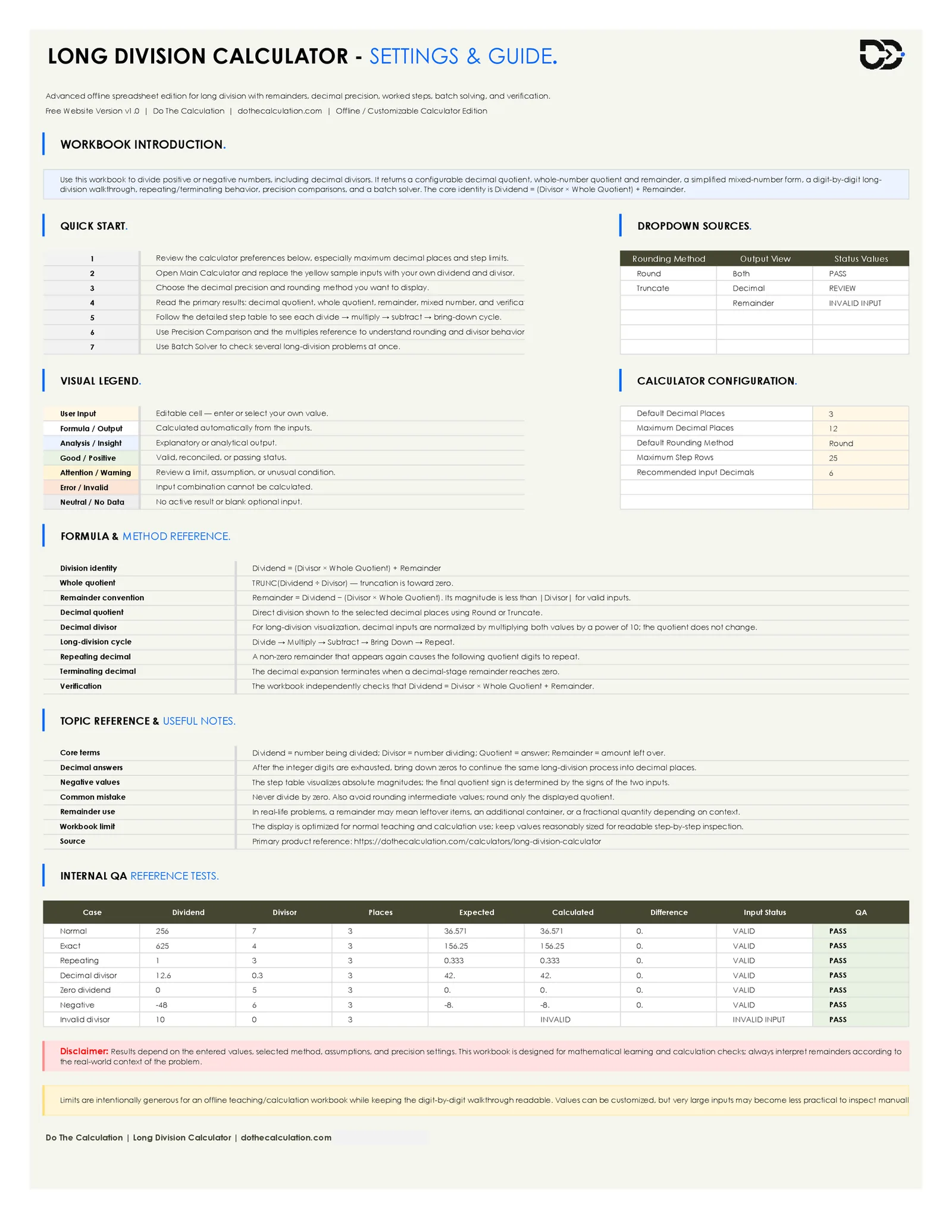
- A Settings & Guide sheet with a quick-start checklist, formula reference, and seven built-in QA test cases
Divide Any Two Numbers Step by Step
The main purpose of this free long division calculator template is to answer more than "what's the quotient"; it's built to show how that quotient was reached. Enter any dividend and divisor, positive or negative, whole number or decimal, and the workbook calculates the result while laying out every step behind it.
- What is the quotient and remainder when I divide two numbers?
- What does the long-division process look like, one digit at a time?
- Does this division terminate, or does the decimal repeat?
- How much does the answer change if I round to 2 decimal places instead of 6?
- How can I verify that a manually worked long-division answer is correct?
- How do I check several division problems at once without repeating the same steps?
Simple Input Fields for Fast Division Calculations
The Calculator sheet's input section is designed so you can enter a division problem without extra setup.
Dividend
Enter the number being divided. Positive, negative, and decimal values are all supported.
Divisor
Enter the number you're dividing by. It cannot be zero. The workbook flags a zero divisor as an invalid input rather than returning an error.
Decimal Places
Choose how many decimal places to display in the quotient, from 0 up to the workbook's configured maximum of 12.
Rounding Method
Choose Round or Truncate to control how the displayed decimal quotient is derived from the exact value.
Step Detail Limit
Set the maximum number of rows shown in the digit-by-digit walkthrough, keeping long or repeating calculations readable.
Clear Output Results You Can Understand
After entering a dividend and divisor, the spreadsheet automatically generates a full set of results, not just a single number.
Decimal Quotient
The division result shown to your selected number of decimal places, using the chosen rounding method.
Whole Quotient
The truncated whole-number result of the division: the number of complete times the divisor fits into the dividend.
Remainder
What's left over after the whole quotient is applied. Its magnitude is always less than the divisor for a valid calculation.
Mixed Number
The whole quotient and remainder expressed as a simplified mixed number, such as 36 4/7.
Decimal Type
Identifies whether the decimal expansion terminates or repeats, based on whether a non-zero remainder reappears during the walkthrough.
Verification
An independent check confirming that Dividend equals Divisor multiplied by the Whole Quotient, plus the Remainder, so you can trust the result without re-deriving it by hand.
See Exactly How the Division Happens, Not Just the Answer
Most calculators stop at the final quotient. This template's Detailed Long-Division Walkthrough table shows every stage of the process: which digit is brought down, what the divisor goes into, how many times it fits, the resulting product, and the remainder carried to the next step, the same working you'd write out on paper, laid out row by row.
Alongside it, the Remainder Pattern table tracks the remainder produced at every step, which is what actually determines whether a decimal terminates or repeats. When a non-zero remainder reappears, the walkthrough flags that row as a repeat, and the workbook uses that pattern to identify the calculation as a repeating decimal automatically, rather than requiring you to spot the cycle yourself.
- Step-by-step phase, digit, working value, quotient digit, product, and remainder
- Plain-language action description for every step ("bring down 5, 7 goes into 25 three times, subtract 21, remainder 4")
- Automatic repeat detection once a remainder value reappears
- A visual remainder-by-step chart and a product chart alongside the numeric table
Built-In Precision and Verification Tools
Rounding can quietly change an answer, especially in a repeating decimal, and this template is built to make that visible rather than hidden. The Precision Comparison table shows the rounded and truncated quotient side by side at every decimal place from 0 through 10, along with the exact error introduced at each level, so you can see precisely how much precision you're giving up at, say, 2 decimal places compared to 6.
A Quick Reference table lists the first several multiples of the divisor, useful for spot-checking a quotient digit by hand. Behind the scenes, the Calculation Summary and Method Support panels track details like divisor decimal shift, normalization places, and scaled dividend and divisor values, used when a decimal divisor is converted to a whole number for the walkthrough. The Settings & Guide sheet also includes seven built-in QA test cases, covering normal division, exact division, repeating decimals, decimal divisors, a zero dividend, negative numbers, and an invalid (zero) divisor, so you can confirm the workbook's own formulas are working correctly before relying on it.
Advanced Calculation Features
The spreadsheet goes beyond a single input-output calculation, with features built for checking work and handling less common cases.
- Batch solver for checking up to 10 division problems at once, each with its own verification and status
- Full support for negative dividends and divisors, with the correct result sign applied automatically
- Support for decimal divisors, normalized internally so the walkthrough stays readable
- Configurable maximum decimal places (up to 12) and maximum walkthrough rows (up to 25)
- Round or truncate display modes, compared side by side in the precision table
- Dynamic insights generated automatically for each calculation, summarizing the remainder, decimal type, and rounding effect in plain language
- A dedicated Settings & Guide sheet with a formula reference, dropdown-driven configuration, and internal QA test cases
Easy to Use, Even for Beginners
The workflow is straightforward. Open the Settings & Guide sheet first to review the visual legend and calculator configuration, then go to the main Calculator sheet and replace the sample dividend and divisor with your own values. Choose your decimal places and rounding method, then read the key results, follow the step-by-step walkthrough, and use the batch solver if you have more than one problem to check. The formulas are already built into the workbook. You only need to update the yellow input cells.
Why Use a Spreadsheet Long Division Calculator?
A quick online calculator is great for a single answer, but a spreadsheet template gives you more to work with when you need to see the reasoning, not just the result, or when you have more than one problem to check.
- Work entirely offline, with no internet connection required
- See the full digit-by-digit walkthrough behind every answer, not just the final quotient
- Check several division problems at once with the batch solver
- Compare rounded and truncated results across multiple decimal places
- Verify your own manually worked answers against an independent check
- Customize decimal precision, rounding method, and walkthrough length to your needs
- Keep a saved, reusable copy for repeated practice or teaching use
Who Should Use This Free Long Division Calculator Template?
Students
Students can use the workbook to check their own long-division homework and see exactly where a manual calculation went right or wrong.
Parents Homeschooling
Parents can use the step-by-step walkthrough to explain the divide-multiply-subtract-bring-down process the same way it would be taught on paper.
Teachers and Tutors
Teachers can use the batch solver to prepare and verify multiple practice problems at once, with an independent check on every answer.
Test Prep Learners
Learners preparing for exams that include manual division can use the precision comparison and multiples reference to build speed and accuracy.
Anyone Checking Manual Work
Anyone who has worked a long-division problem by hand can enter the same numbers here to confirm the quotient, remainder, and decimal behavior.
Curriculum and Worksheet Developers
Developers building practice materials can use the batch solver and QA test cases to generate and verify multiple problems quickly.
Benefits of This Free Long Division Spreadsheet
- Shows the full working, not just the final answer
- Detects repeating and terminating decimals automatically
- Supports negative numbers and decimal divisors
- Independently verifies every result
- Includes a batch solver for multiple problems at once
- Compares rounded and truncated precision side by side
- Beginner-friendly layout with a color-coded visual legend
- No macros or VBA required
- Free to download and reusable for repeated practice
What You Get in the Download
This template downloads as a single ready-to-use Excel workbook (.xlsx), no ZIP folder to extract. Open it and the sample dividend and divisor are already filled in, so you can see the full walkthrough working before you replace them with your own numbers.
Practical Tips Before You Start
- Start with the Settings & Guide sheet before touching the Calculator sheet. It explains the visual legend and every configuration option.
- Raise the decimal places gradually if you want to see exactly where a repeating pattern starts, rather than jumping straight to the maximum of 12.
- Use the Step Detail Limit to keep a long repeating-decimal walkthrough readable instead of scrolling through dozens of identical rows.
- Run the batch solver when you have several problems from the same worksheet or assignment, instead of re-entering the Calculator sheet each time.
- Check the Verification row first if a result looks off. It's the fastest way to confirm whether the workbook's own math is correct before questioning your input.
- Use the Precision Comparison table to decide how many decimal places actually matter for your use case before rounding a final answer.
Common Mistakes to Avoid
- Entering a zero divisor and expecting a numeric result. The workbook correctly flags this as invalid input rather than dividing by zero.
- Rounding an intermediate value before the final answer. Round only the displayed quotient, not the numbers used to build the walkthrough.
- Assuming a decimal divisor breaks the walkthrough. The workbook normalizes decimal divisors internally, so the steps stay readable and the quotient doesn't change.
- Reading the whole quotient and remainder as the same thing as the decimal quotient. They answer different questions (complete groups plus leftover vs. a fractional answer).
- Overwriting a formula cell instead of the yellow input cells. This can break the walkthrough or verification check for that row.
- Entering unreasonably large numbers for a teaching or homework context. The workbook is optimized for readable, inspectable steps, not extreme-magnitude calculations.
Limitations and Honest Notes
- This template is a calculation and verification tool designed to support learning and check manual work. It's not a replacement for understanding the underlying long-division method.
- The workbook uses no VBA or macros by design.
- It's built primarily for Microsoft Excel; Google Sheets compatibility is reasonable but not guaranteed to be identical, particularly for chart formatting.
- The display is optimized for normal teaching and calculation use. Keep values reasonably sized for a readable, inspectable step-by-step walkthrough.
- The batch solver checks up to 10 problems at once and the walkthrough shows up to 25 steps; problems needing more than that should be split across batch runs.
- Save a backup copy of the file before making structural edits. Formulas can break if a white output cell is overwritten with typed text or numbers.
- Unauthorized resale or redistribution of the template file itself is not permitted.
Frequently Asked Questions
What is a Long Division Calculator spreadsheet?
It's a downloadable Excel-style workbook that divides two numbers and shows the full digit-by-digit long-division process behind the result, rather than just returning a final quotient.
Is this long division calculator template free?
Yes. This spreadsheet template is free to download, with no account or payment required.
Does it handle decimal answers, not just whole numbers?
Yes. You can set the decimal precision up to 12 places and choose whether the displayed quotient is rounded or truncated.
Can it divide negative numbers?
Yes. The workbook supports negative dividends and divisors and applies the correct result sign automatically.
Can the divisor be a decimal number, like 0.3?
Yes. Decimal divisors are supported: the workbook normalizes the values internally so the step-by-step walkthrough stays readable.
Does the spreadsheet show the actual long-division steps, or just the answer?
It shows both. The Detailed Long-Division Walkthrough table lays out every divide, multiply, subtract, and bring-down step, alongside the final quotient, remainder, and mixed number.
How do I know if a decimal terminates or repeats?
The workbook tracks the remainder at every step and flags a row as a repeat once a non-zero remainder reappears, then reports the decimal as repeating or terminating automatically.
Can I check more than one division problem at a time?
Yes. The batch solver lets you enter up to 10 separate division problems and see the quotient, remainder, and verification status for each one.
How does the workbook verify its own answers?
Every calculation is checked against the identity Dividend = (Divisor × Whole Quotient) + Remainder, and the Settings & Guide sheet includes seven built-in test cases covering normal, exact, repeating, decimal-divisor, zero-dividend, negative, and invalid-divisor scenarios.
Is this template a replacement for learning long division by hand?
No. It's a calculation and verification tool designed to support learning and check manual work, not to replace understanding the underlying method.
What exactly do I get when I download the file?
A single ready-to-use Excel workbook (.xlsx) with sample values already filled in: no ZIP folder or separate blank version, just open it and replace the sample dividend and divisor with your own.